
Choose what your battery backup should power
Make an essential, important and optional load list. Use a household worksheet to bring clear priorities to your solar-and-battery consultation.
Request My Solar Assessment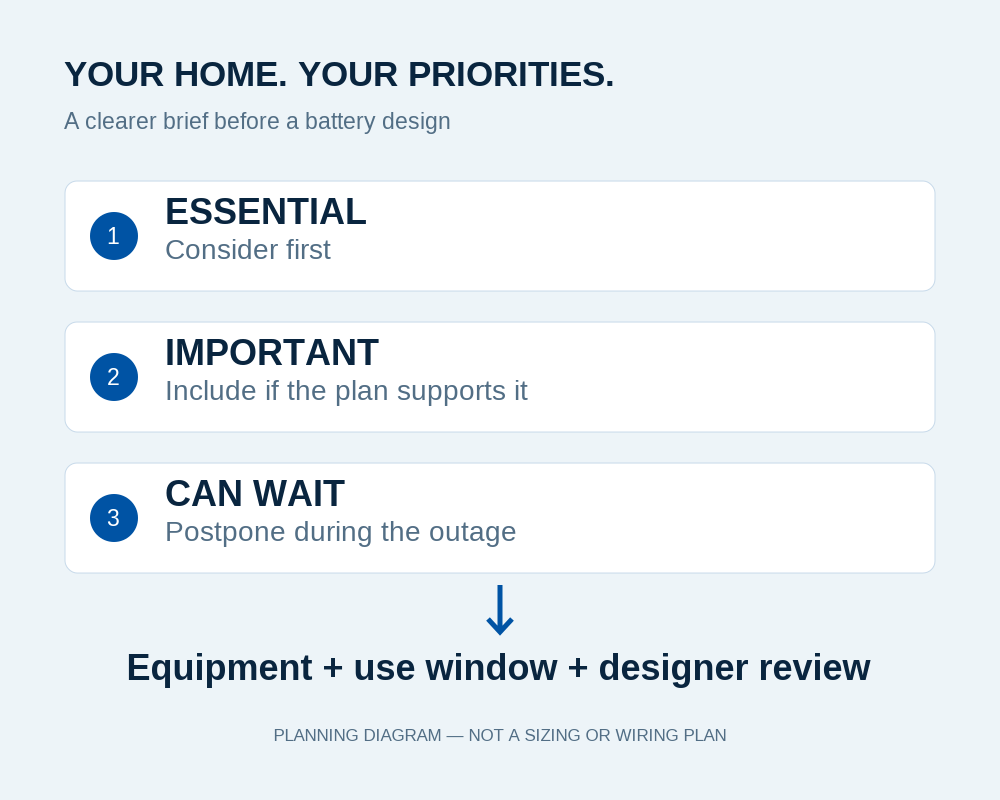
Start with the household needs you want to support during an outage, then mark each one essential, important or able to wait. For every item, record the actual equipment, when you would use it and what remains unknown. Bring that list to a designer to confirm supported circuits, power demand, storage and charging assumptions before choosing a battery.
References checked November 18, 2026. Source: DOE: solar, storage and outage resilienceSort the needs before you shop for a battery.
Start with a simple question: what would we need to keep doing if the grid went down? Write the tasks first, such as keeping food cold, charging phones or lighting a route through the home. Then name the appliances or equipment behind each task. One broad label like kitchen can hide several very different loads.
Use three priority levels. Essential means you want that need considered first in the proposed design. Important means useful if the design and budget support it. Can wait means you would postpone that use during the outage. These are your preferences for a design conversation, not confirmation that a circuit is backed up.
Give timing some context. Write overnight, a short work period or occasional use instead of just all day. Note anything you expect to use at the same time. Leave the required battery size blank until the equipment and operating assumptions have been assessed.
- Essential - discuss first; confirm the exact supported loads.
- Important - include if compatible with the agreed scope.
- Can wait - identify what you are willing to postpone.
Record the equipment you actually have.
Copy the model number and readable nameplate information from a safely accessible label, or save the manufacturer manual. Write Unknown when you cannot confirm a detail. Do not move heavy appliances, open an electrical panel or disconnect equipment to complete this worksheet.
Keep power and energy separate in your notes. Power, commonly shown in watts or kilowatts, describes demand at a moment. Energy, commonly shown in watt-hours or kilowatt-hours, describes use over time. EIA explains this distinction. A storage figure alone does not tell you which combination of appliances a proposed system can run.
Tell the designer about equipment with changing settings, motors or heating elements and ask how operating and starting requirements will be checked for the exact model. A household bill provides context for overall use; it does not replace an assessment of the selected backup loads.
Reference: EIA explains watts and watt-hours. Bring labels and manuals for the equipment on your list.
Fill in your household backup worksheet.
Copy the rows below into your notes and remove any that do not apply. Add Essential, Important or Can wait to each entry, then give it a desired-use window. The examples identify questions to investigate, not equipment that every battery can support.
Keep the last column open for the designer. A name on your wish list is different from a circuit identified in the written proposal. Record unresolved items rather than filling gaps with a typical appliance wattage found online.
| HOUSEHOLD NEED | YOUR NOTE | DESIGNER REVIEW |
|---|---|---|
| Food storage | Priority; exact fridge/freezer; use window | Equipment and supported circuit |
| Lighting | Priority; rooms or fixtures; use window | Which lights are included |
| Communication | Priority; modem/router/chargers; use window | Equipment supply and limits |
| Work or study | Priority; devices; simultaneous use | Combined demand |
| Kitchen tasks | Priority; exact appliance; short-use plan | Operating and starting needs |
| Heating or cooling | Priority; exact system; comfort goal | Feasibility and demand |
| Pumps or other fixed loads | Priority; model; purpose; use window | Equipment and circuit review |
| Your other priority | Priority; model; when needed | Open design question |
Original Bulldog planning worksheet. Keep model, priority and desired use together. No row is a promise of backup coverage, duration or uninterrupted service.
Test your list against one ordinary evening.
Here is a hypothetical household example. Two residents put food storage and a few lights in Essential, a laptop and home-network equipment in Important, and laundry in Can wait. They have recorded the laptop model, but the refrigerator information is still missing. That missing detail stays on the question list.
They then describe the evening they want to plan for: food storage, the selected lights and one work session, followed by overnight use of the agreed essentials. The designer must check that scenario against the actual equipment and proposed system. No battery count or runtime follows automatically from those category names.
The same exercise may change the priorities. If work cannot be postponed, move the laptop into Essential and explain when it is needed. If internet access matters, ask about the modem and router power requirements, while keeping a separate communication fallback: powering home-network equipment does not guarantee that the outside provider network will be operating.
Ask for the backup boundary in writing.
Ask the proposal to identify the specific circuits or loads it includes, along with any excluded uses. PNNL describes designs that serve selected critical circuits rather than an entire home. Your design review should explain the intended backup boundary for your property.
Discuss the power available for simultaneous use, usable stored energy, reserve settings and the conditions behind any runtime estimate. Ask how charging works during an outage, including at night or with limited sunshine, and what happens if the stored energy is depleted. Keep the answer tied to the equipment and design being proposed.
Solar panels alone are not an outage-power guarantee. DOE explains that grid-connected systems generally shut down when grid power is lost, and that independent operation requires an appropriate inverter and storage configuration. Confirm outage operation for the complete proposed system rather than assuming every solar installation provides it.
Explore the service overview: solar battery backup. Use your completed worksheet to make that discussion specific.
Technical background: PNNL on battery backup and selected circuits. Equipment-specific design still needs qualified review.
Bring your priorities to a Bulldog solar assessment.
Start with your property ZIP code, whether you already have solar, the main outage needs you want to discuss and the equipment details you have confirmed. Ask the Bulldog Home Services team to confirm solar service availability for your address and explain the next assessment step. Your worksheet can stay in your own notes until the team tells you how to share the relevant details.
Request a written scope and installed price based on the agreed priorities, equipment, compatibility and electrical work. Keep a separate list of unresolved items, such as a missing model number or a desired load that has not been assessed. An inquiry starts the conversation; it does not book an installation or approve a design.
Keep a wider household outage plan alongside the project. CDC includes emergency lighting and alternative device-charging methods in its preparedness guidance. If powered medical equipment is involved, make a separate outage plan with the relevant device and healthcare providers; this worksheet does not establish safe backup for that equipment.
For the wider project, see planning a home solar system and bring a recent bill to the conversation.
For common project questions, review our solar and battery FAQ. The exact proposal determines your coverage and terms.
Good questions. Clear next steps.
What should I put on my battery-backup essentials list?
Start with the household tasks you most want to support, then identify the exact equipment behind each one. Rank the loads, describe when they are needed and mark unknown model details. The designer confirms what the proposed system can support; Essential on your worksheet is a priority, not an approved backup circuit.
Can a home battery run my air conditioner?
That needs a review of the exact cooling equipment, its operating and starting requirements, the proposed battery system and the other loads used at the same time. Put cooling on the worksheet if it matters to you and ask for a written assessment. Do not assume it is included because a proposal mentions home backup.
How long will a home battery last during an outage?
Runtime depends on usable stored energy, the supported loads and how they are used, system settings and any charging available during the outage. Ask for an estimate with its assumptions stated. This worksheet does not assign a number of hours or replace equipment-specific design.
Will solar panels keep working when the grid is down?
Do not assume ordinary grid-connected solar supplies outage power. Independent operation depends on a suitable complete system and configuration. Ask the designer to explain how the exact proposed solar, inverter, storage and controls would operate during an outage.
How much does home battery backup cost?
The installed price depends on the selected equipment, storage and power requirements, supported loads, compatibility with existing solar, controls and any electrical or site work. Request an itemized proposal for your property and priorities. This guide does not set a Bulldog price or treat a battery product price as the full installed cost.
Can I add battery backup to solar panels I already own?
Ask for a compatibility review of the existing equipment and the proposed storage design. Record the installed solar and inverter model information you can safely obtain. Owning panels does not establish that a particular battery or outage configuration will work with them.
What should I send with my first Bulldog request?
Share your ZIP code, whether solar is already installed and a brief description of your main backup goals. Keep the detailed equipment list ready for the consultation. The team confirms address availability, the appropriate assessment and how to provide any further information.
Sources & further reading
Primary references for the facts cited in this guide. Provider requirements and published prices can change.
Bring the priorities. Build a clearer backup plan.
Ask Bulldog about solar and battery options for your property. Start with your ZIP code and the household needs you want the design to consider.