
Plan your home camera coverage before choosing equipment
Use a practical camera coverage worksheet to prioritize entrances, check lighting and blind spots, and prepare for a Bulldog security assessment.
Request a Security Assessment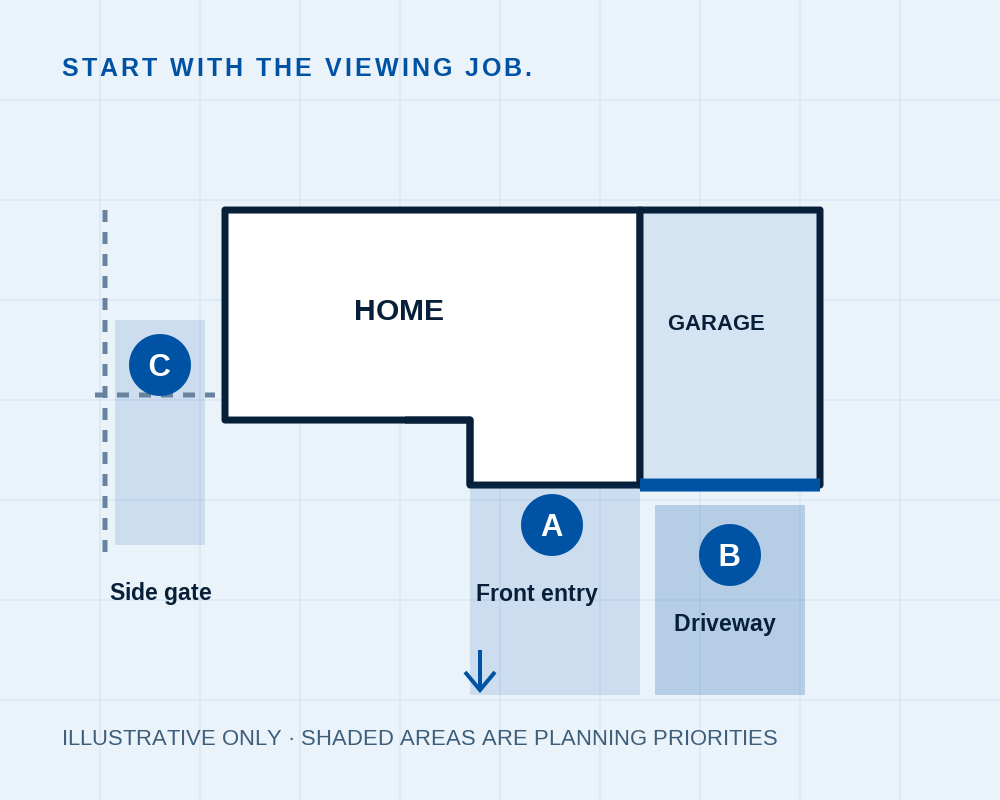
Start with the activity you need to see, then walk each area in daylight and after dark. Record the approach, obstructions, lighting, power, connection and views to avoid. Use that plan to evaluate camera positions and recorded images before deciding how many cameras to buy. A wide view of the yard does not, by itself, show whether a visitor or delivery will be clear.
References checked November 13, 2026. Source: Google Home and Nest Help: Learn about camera placementGive every view a specific job.
Write down the question each camera should help you answer: Who is at the front door? Where was a delivery placed? Is someone approaching the side gate? Start with the locations that matter to your household, rather than choosing a package by camera count.
Separate an overview from a detail view. Seeing that someone crossed a driveway is a different task from getting a useful view of the person at the door. Distance, angle, lighting and the chosen equipment affect the result; a higher resolution label alone does not settle the plan.
For a Houston, Dallas–Fort Worth or San Antonio home, the same observation method applies. Your property layout and address-specific service availability determine the next step with Bulldog.
- List your busiest entrance and the approach a visitor uses.
- Identify the delivery spot, driveway or gate you actually want to check.
- Mark views you do not need, including neighboring private areas.
- Rank the jobs: essential first, useful later.
Walk the property by day and after dark.
From a safe place at ground level, trace the route from the approach to the activity you want to see. Note porch columns, open doors, vehicles, plants and roof overhangs that could block the view. Repeat the observation under normal evening lighting. Do not climb or alter wiring to complete this exercise.
Look for a bright sky behind a visitor, a porch light aimed toward the proposed camera, and nearby surfaces that could reflect infrared light. Google’s Nest placement guidance describes how backlighting, obstacles and reflections can affect its cameras. Check the equivalent instructions for the exact model proposed for your home.
A window is not automatically a good shortcut. Nest notes that glass can reflect infrared light and interfere with night vision; detection behavior can also vary by camera. Ask the installer to review an appropriate outdoor-rated location, mounting method and power accessories instead of assuming an indoor view through glass will work.
For the manufacturer-specific examples, see Google Nest camera placement guidance. Your final installation must follow the chosen equipment’s instructions.
Use this example to separate the views.
Imagine a home with a recessed front door, a driveway beside it and a side gate partly hidden by a fence. A camera overlooking the driveway may show arrivals while the recess hides the delivery spot. The point of the sketch is to list separate viewing jobs—not to prescribe three cameras or certify coverage.
Try the same exercise on a simple outline of your home. Draw the entry and approach, then mark what blocks the view. Label a proposed view A, B or C and match it to a worksheet row. Keep the drawing private; an initial inquiry does not need a detailed floor plan or private camera footage.
| Illustrative area | Question to answer | What needs checking |
|---|---|---|
| A · Front entry | Who reached the door, and where was the delivery left? | Door recess, opening door, visitor angle and porch lighting. |
| B · Driveway | What activity is happening near the parked vehicles? | A parked vehicle blocking the approach; detail at the far end. |
| C · Side gate | Is there activity at this entrance? | Fence corner, plants and unwanted views beyond the property. |
An invented planning example. The diagram’s shaded areas are observation priorities, not measured camera fields of view or a completed Bulldog installation.
Make a coverage worksheet you can bring to an assessment.
Copy or print this table and add one row for each viewing job. Use ordinary descriptions such as “front door” rather than an exact address. Record what you observed, and leave technical choices for the equipment review. You can also make a simple sketch on the reverse.
Where one location has two jobs, give each its own row. That makes the trade-off visible: an overview may be acceptable for one task while another needs a different angle or closer view.
| Area + goal | Day / night | Setup + priority |
|---|---|---|
| Area: ______ Goal: ______ | Blocks: ______ Light: ______ | Power: ______ Signal: ______ Priority: ______ Avoid: ______ |
| Area: ______ Goal: ______ | Blocks: ______ Light: ______ | Power: ______ Signal: ______ Priority: ______ Avoid: ______ |
| Area: ______ Goal: ______ | Blocks: ______ Light: ______ | Power: ______ Signal: ______ Priority: ______ Avoid: ______ |
Keep passwords, alarm codes, account recovery information and private images off the worksheet. You do not need to upload it to make an initial inquiry.
Check the proposed view and the features behind it.
Before finalizing the position, ask how the installer will check both the live view and a sample recording for each job. Review normal daylight and nighttime conditions where practical. A clear live image does not establish which clips are saved, how long they remain available or which notifications are included.
Ask about the exact model’s power supply, weather suitability, network requirements and supported recording plan. For cameras that upload video, available upload capacity matters as well as the connection at the mounting point. Google’s Nest bandwidth guidance explains that multiple cameras share available upload bandwidth; requirements depend on the model and video settings.
Aim for the intended area and keep unnecessary private views out of the frame. Ask whether the proposed model supports a privacy mask and what it changes. Ring, for example, says Privacy Zones obscure part of live and recorded video, but motion can still be detected there. A motion or activity zone is not automatically the same as an image privacy mask.
Include account security in the handover: current software, a unique password, available two-factor authentication and access limited to the people who need it. The FTC explains these safeguards. This planning guide does not determine legal recording permissions or replace equipment-specific setup instructions.
For an existing system you inherited, use our home security ownership and move-in guide for the separate account-handoff questions.
Turn your priorities into a clear proposed scope.
Bring your top viewing jobs and unresolved questions to Bulldog Home Services. Our team can review security and camera options for your address and discuss the equipment, installation and service scope. Ask for the essential views and optional additions to be separated in the written proposal.
A useful proposal identifies the equipment, intended views, installation work, recording and monitoring terms where applicable, ongoing charges and how the setup will be demonstrated. Cameras and recording do not guarantee crime prevention or identification in every situation. Service availability and equipment suitability need confirmation for your home.
Explore our security and smart-home services or start with the assessment below.
Good questions. Clear next steps.
How many security cameras do I need for my house?
Start with the viewing jobs, not a fixed number. List the entrances and activities you need to see, then check whether the proposed views meet those goals under realistic lighting and obstruction conditions. The layout, equipment and your priorities determine the count.
Is a doorbell camera enough?
It may address a front-door task if the position and model provide a useful view. It does not establish coverage of a side gate, driveway or hidden delivery spot. Evaluate those as separate jobs rather than assuming one device sees everything.
Can I put an indoor camera behind a window?
Check the exact model’s instructions. Glass can reflect infrared light and affect night vision, and detection behavior varies. Do not assume an indoor camera pointed through glass will work like a suitable outdoor installation.
Will night vision guarantee a clear view of a face?
No. Distance, angle, movement, lighting, reflections, settings and the equipment all affect the image. Ask to review a representative recorded view for the job you want the camera to do.
How much will a home camera installation cost?
The cost depends on the number and type of cameras, mounting and power work, connectivity and the recording or service plan. Ask Bulldog for an address-specific written proposal that separates installation from ongoing charges. This worksheet is not a price quote.
What should I send with my first Bulldog inquiry?
Share your contact details, service ZIP code and the entrances or activities you want help viewing. Bulldog can confirm the next step for your address. Do not send passwords, alarm codes, account recovery codes or private camera footage through a general inquiry.
Sources & further reading
Primary references for the facts cited in this guide. Provider requirements and published prices can change.
- Google Home and Nest Help: Learn about camera placement
- Federal Trade Commission Consumer Advice: How To Secure Your Home Security Cameras
- Google Home and Nest Help: Internet bandwidth and speed requirements for Nest cameras
- Google Home and Nest Help: Tips for respecting the privacy of others when using Google Nest products
- Ring Help: Using privacy features in the Ring app
- Ring Help: Using Motion Zones for Cameras and Doorbells
Get a camera plan built around your home.
Tell Bulldog which entrances and activities you want help viewing. We can review the options and next step for your address.